Lockout Revealed As The Fifth Re-Imagined Multiplayer Map For Halo: The Master Chief Collection


Microsoft yesterday revealed that Lockout is the fifth map that will be part of the collection.
Set in an old Forerunner research laboratory in the frigid mountains of Delta Halo, Lockout features fast-paced, close quarters combat with its narrow corridors and vertical level design. With three levels to navigate, adept players can deftly traverse around the map by mastering specific jumping points, enabling them to secure power weapons faster and set up ambushes for unsuspecting opponents.
The re-imagined version of Lockout also includes a few new features that will surprise even the most hardened Halo 2 veterans.
“Lockout was hands-down the most popular small arena-style map in Halo 2,” said Max Hoberman, president of Certain Affinity and one of the original lead designers of Halo 2.
Source: xbox wire

Lockout Revealed As The Fifth Re-Imagined Multiplayer Map For Halo: The Master Chief Collection


Microsoft yesterday revealed that Lockout is the fifth map that will be part of the collection.
Set in an old Forerunner research laboratory in the frigid mountains of Delta Halo, Lockout features fast-paced, close quarters combat with its narrow corridors and vertical level design. With three levels to navigate, adept players can deftly traverse around the map by mastering specific jumping points, enabling them to secure power weapons faster and set up ambushes for unsuspecting opponents.
The re-imagined version of Lockout also includes a few new features that will surprise even the most hardened Halo 2 veterans.
“Lockout was hands-down the most popular small arena-style map in Halo 2,” said Max Hoberman, president of Certain Affinity and one of the original lead designers of Halo 2.
Source: xbox wire

FIFA 15 heading to Windows Phone


French gaming site Pockett.net reports that FIFA 15 is definitely heading to Windows Phone.
The titbit is news, as EA Mobile has not announced the game for our platform, but has for iOS and Android.
The game will feature a variety of new touch-optimised gameplay improvements, which can be seen in a demo video from Gamescon after the break.
The exact release date for Windows Phone is not known yet. The game will likely be free with in-app purchases.


FIFA 15 heading to Windows Phone


French gaming site Pockett.net reports that FIFA 15 is definitely heading to Windows Phone.
The titbit is news, as EA Mobile has not announced the game for our platform, but has for iOS and Android.
The game will feature a variety of new touch-optimised gameplay improvements, which can be seen in a demo video from Gamescon after the break.
The exact release date for Windows Phone is not known yet. The game will likely be free with in-app purchases.


HTC One for Windows brings 1080p 60fps video, slow motion and more to Windows Phone


The HTC One for Windows Phone has been heralded for bringing the best designed Android phone to Windows Phone, but HTC has also done a great job bringing some of their software features to our ecosystem also.
While Nokia is very well known for their great cameras, the company has so far resisted bringing some features very commonly found on Android handsets to Windows Phone.
One of those is HDR mode, which the HTC One for Windows support.  Another, which is not available on any Windows Phone, is the ability to record 1080P video in 60 fps, and related to this, the ability to record video in actual, rather than interpolated slow motion.
Another very useful feature is a much easier to use Panorama mode, rather than the clunky 2009 version in Nokia’s handsets.
Lastly, the HTC One for Windows also allows users to take still pictures while recording video.
While Nokia still has the image quality crown, having the choice of another great Windows Phone to get features Nokia does not support is also pretty good.

HTC One for Windows brings 1080p 60fps video, slow motion and more to Windows Phone


The HTC One for Windows Phone has been heralded for bringing the best designed Android phone to Windows Phone, but HTC has also done a great job bringing some of their software features to our ecosystem also.
While Nokia is very well known for their great cameras, the company has so far resisted bringing some features very commonly found on Android handsets to Windows Phone.
One of those is HDR mode, which the HTC One for Windows support.  Another, which is not available on any Windows Phone, is the ability to record 1080P video in 60 fps, and related to this, the ability to record video in actual, rather than interpolated slow motion.
Another very useful feature is a much easier to use Panorama mode, rather than the clunky 2009 version in Nokia’s handsets.
Lastly, the HTC One for Windows also allows users to take still pictures while recording video.
While Nokia still has the image quality crown, having the choice of another great Windows Phone to get features Nokia does not support is also pretty good.

Microsoft Announces Stricter Policies On Naming Of Apps In Windows Store, Removes 1500 Spam Apps


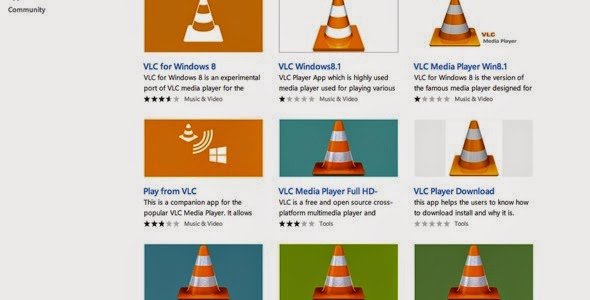
Apart from the lack of key apps, Microsoft’s Windows Store faces another key issue of having fake apps in the Store. For example, searching for VLC will give you the above search results page, out of which only one is the official app. Recently, Microsoft responded that they are looking to fix this problem in Windows Store. Today, they announced revised policies for Windows Store that won’t allow such kind of apps in Windows Store.
These changes included:
  • Naming – to clearly and accurately reflect the functionality of the app.
  • Categories – to ensure apps are categorized according to the app function and purpose.
  • Icons – must be differentiated to avoid being mistaken with others.
These revised policies are being applied to all new app submissions and existing app updates for both the Windows and Windows Phone Store. Another good news is that they are applying this new policies with the existing apps in Windows Store and they are removing over 1,500 apps from Store.
We’ve also been working on titles already in the catalog, conducting a review of Windows Store to identify titles that do not comply with our modified certification requirements. This process is continuing as we work to be as thorough and transparent as possible in our review. Most of the developers behind apps that are found to violate our policies have good intentions and agree to make the necessary changes when notified. Others have been less receptive, causing us to remove more than 1,500 apps as part of this review so far (as always we will gladly refund the cost of an app that is downloaded as a result of an erroneous title or description).
Read more about it here.

Microsoft Announces Stricter Policies On Naming Of Apps In Windows Store, Removes 1500 Spam Apps


Apart from the lack of key apps, Microsoft’s Windows Store faces another key issue of having fake apps in the Store. For example, searching for VLC will give you the above search results page, out of which only one is the official app. Recently, Microsoft responded that they are looking to fix this problem in Windows Store. Today, they announced revised policies for Windows Store that won’t allow such kind of apps in Windows Store.
These changes included:
  • Naming – to clearly and accurately reflect the functionality of the app.
  • Categories – to ensure apps are categorized according to the app function and purpose.
  • Icons – must be differentiated to avoid being mistaken with others.
These revised policies are being applied to all new app submissions and existing app updates for both the Windows and Windows Phone Store. Another good news is that they are applying this new policies with the existing apps in Windows Store and they are removing over 1,500 apps from Store.
We’ve also been working on titles already in the catalog, conducting a review of Windows Store to identify titles that do not comply with our modified certification requirements. This process is continuing as we work to be as thorough and transparent as possible in our review. Most of the developers behind apps that are found to violate our policies have good intentions and agree to make the necessary changes when notified. Others have been less receptive, causing us to remove more than 1,500 apps as part of this review so far (as always we will gladly refund the cost of an app that is downloaded as a result of an erroneous title or description).
Read more about it here.

Hike Messenger Updated With New Privacy Features And Other Improvements


Hike Messenger got updated in Windows Phone Store to v2.7.0.0. This update brings in advanced privacy features, new themes and more.
? Hidden Mode: An awesome new hike privacy feature which allows you to hide the chats that you want to keep private from the world and access them only with a password! No one except you can read them anymore \o/
? Choose Who Sees Your Profile Picture: Only your selected friends can now see your display picture!
? Hide Content Preview in Notification: An advanced privacy feature giving you the ability to hide content from the push notification.
? Copy Status Updates: Now you can easily copy your friend’s status updates in the timeline by long pressing and hitting copy.
? View Undelivered Images: Simply long press an attachment to view
? New Chat Themes: You will absolutely love the 4 new chat themes we have added
? Turn Off Auto Save to Gallery: No more taking up valuable storage space. You can always manually save the image later.
? Bug Zapping: Fixed the sticker crash bug and managed to zap many more bugs (even the massive sugar water-drinking ones from Men In Black)
 Download the update here from Windows Phone Store for free.

Hike Messenger Updated With New Privacy Features And Other Improvements


Hike Messenger got updated in Windows Phone Store to v2.7.0.0. This update brings in advanced privacy features, new themes and more.
? Hidden Mode: An awesome new hike privacy feature which allows you to hide the chats that you want to keep private from the world and access them only with a password! No one except you can read them anymore \o/
? Choose Who Sees Your Profile Picture: Only your selected friends can now see your display picture!
? Hide Content Preview in Notification: An advanced privacy feature giving you the ability to hide content from the push notification.
? Copy Status Updates: Now you can easily copy your friend’s status updates in the timeline by long pressing and hitting copy.
? View Undelivered Images: Simply long press an attachment to view
? New Chat Themes: You will absolutely love the 4 new chat themes we have added
? Turn Off Auto Save to Gallery: No more taking up valuable storage space. You can always manually save the image later.
? Bug Zapping: Fixed the sticker crash bug and managed to zap many more bugs (even the massive sugar water-drinking ones from Men In Black)
 Download the update here from Windows Phone Store for free.

Prestigio MultiPhone 8500 DUO Windows Phone reviewed (video)


MobileGeeks have posted the above video review of the new Prestigio MultiPhone 8500 DUO Windows Phone 8.1 smartphone.
Prestigio, based in Cyprus, is one of the new Windows Phone OEMs, and the handset is extremely affordable, costing less than £160 for a 720P handset with 8 GB storage.
The handset features:
5 inch 720P IPS screen with Gorilla Glass, 1 GB RAM, 8 GB internal storage, Snapdragon 200 processor, 2 megapixel front and 8 megapixel rear camera (no LTE) in an 8.5 mm body for only 154 Euro ($200).
Of note is that Mobilegeeks notices some lagging with the device, suggesting 720P may be too much for the SnapDragon 200 processor to manage efficiently.
They do still however note that the device was “quite a pleasure to use for 154 Euro.”
Certainly Windows Phone fans on a budget now have a real choice between spending the same amount of money on a lower-specced Nokia device or a much better specced but possibly less optimised and supported handset from others.

Prestigio MultiPhone 8500 DUO Windows Phone reviewed (video)


MobileGeeks have posted the above video review of the new Prestigio MultiPhone 8500 DUO Windows Phone 8.1 smartphone.
Prestigio, based in Cyprus, is one of the new Windows Phone OEMs, and the handset is extremely affordable, costing less than £160 for a 720P handset with 8 GB storage.
The handset features:
5 inch 720P IPS screen with Gorilla Glass, 1 GB RAM, 8 GB internal storage, Snapdragon 200 processor, 2 megapixel front and 8 megapixel rear camera (no LTE) in an 8.5 mm body for only 154 Euro ($200).
Of note is that Mobilegeeks notices some lagging with the device, suggesting 720P may be too much for the SnapDragon 200 processor to manage efficiently.
They do still however note that the device was “quite a pleasure to use for 154 Euro.”
Certainly Windows Phone fans on a budget now have a real choice between spending the same amount of money on a lower-specced Nokia device or a much better specced but possibly less optimised and supported handset from others.

Microsort Cancels Nokia Developer Ambassador Program


As part of the restructuring efforts around the Nokia Developer team acquired as part of Nokia Devices and Services Division, Microsoft recently ended the Nokia Developer Ambassador program. For Nokia DVLUP developers in North America, Nokia organized a group of dedicated, hard-working Windows Phone app experts, known as the Nokia Developer Ambassadors, who can assist other developers with technical support, give them new ideas, and generally show them the ropes when it comes to getting started with your Windows Phone app development efforts.
I guess, Microsoft will be now focused on Windows Phone based MVPs for doing the same job.

Microsort Cancels Nokia Developer Ambassador Program


As part of the restructuring efforts around the Nokia Developer team acquired as part of Nokia Devices and Services Division, Microsoft recently ended the Nokia Developer Ambassador program. For Nokia DVLUP developers in North America, Nokia organized a group of dedicated, hard-working Windows Phone app experts, known as the Nokia Developer Ambassadors, who can assist other developers with technical support, give them new ideas, and generally show them the ropes when it comes to getting started with your Windows Phone app development efforts.
I guess, Microsoft will be now focused on Windows Phone based MVPs for doing the same job.

Windows Phone 9 may be previewed in early 2015


Mary Jo Foley has revealed that we will see the next version of Windows Phone either in January or February 2015. The update, code-named Threshold, will combine Windows Phone and Windows RT.
Mary Jo writes:
There will be a separate preview of Threshold running on ARM processors, too. My sources are saying the current target date for that preview is January or February 2015. As the ARM-based version of Threshold – which should run on both Windows Phones and tablets — isn’t expected to include the Windows desktop, the focus will be on changes Microsoft is making to the Metro-Style Start screen environment.
At this point it is not clear what the UI of these new devices will be, but interactive Live Tiles have been strongly rumoured for the new OS, and Mary Jo’s sources have also said the OS will support side by side apps.
The January and February unveil for WP9 suggests we may see the OS at CES or Mobile World Congress 2015. Microsoft is expected to show an early preview of the desktop version of the OS in late September or early October.

Windows Phone 9 may be previewed in early 2015


Mary Jo Foley has revealed that we will see the next version of Windows Phone either in January or February 2015. The update, code-named Threshold, will combine Windows Phone and Windows RT.
Mary Jo writes:
There will be a separate preview of Threshold running on ARM processors, too. My sources are saying the current target date for that preview is January or February 2015. As the ARM-based version of Threshold – which should run on both Windows Phones and tablets — isn’t expected to include the Windows desktop, the focus will be on changes Microsoft is making to the Metro-Style Start screen environment.
At this point it is not clear what the UI of these new devices will be, but interactive Live Tiles have been strongly rumoured for the new OS, and Mary Jo’s sources have also said the OS will support side by side apps.
The January and February unveil for WP9 suggests we may see the OS at CES or Mobile World Congress 2015. Microsoft is expected to show an early preview of the desktop version of the OS in late September or early October.
Via ZDNet.com

Microsoft Is Working To Fix The Heat Issue In Surface Pro 3 Core i7 Models


Microsoft today acknowledged the Surface Pro 3 heating issues and promised that they will be releasing an update to fix this issue soon. They also revealed that this affects very small number of Surface Pro 3 Intel Core i7 devices which are temporarily restarting and incorrectly showing a “Thermometer Gauge” icon while attempting to boot up
“The Surface Team is aware of a very small number of Surface Pro 3 Intel® Core™ i7 devices that are temporarily restarting and incorrectly showing a “Thermometer Gauge” icon while attempting to boot up. Our investigation reveals that the system is triggering this event sooner than it should for some people, only when the device restarts, and this does not occur when the device is booted and running. We have an update that will address this that will be ready for our customers as soon as possible.
The i7 version of Surface Pro 3 is a first-of-its-kind tablet delivering i7 processing power in a thin and light package. As such, the increased power calls for the fan to spin more regularly and at higher speeds – and for the unit to run slightly warmer. If customers have any questions or concerns, they should contact Microsoft Support.”
Source: neowin

Microsoft Is Working To Fix The Heat Issue In Surface Pro 3 Core i7 Models


Microsoft today acknowledged the Surface Pro 3 heating issues and promised that they will be releasing an update to fix this issue soon. They also revealed that this affects very small number of Surface Pro 3 Intel Core i7 devices which are temporarily restarting and incorrectly showing a “Thermometer Gauge” icon while attempting to boot up
“The Surface Team is aware of a very small number of Surface Pro 3 Intel® Core™ i7 devices that are temporarily restarting and incorrectly showing a “Thermometer Gauge” icon while attempting to boot up. Our investigation reveals that the system is triggering this event sooner than it should for some people, only when the device restarts, and this does not occur when the device is booted and running. We have an update that will address this that will be ready for our customers as soon as possible.
The i7 version of Surface Pro 3 is a first-of-its-kind tablet delivering i7 processing power in a thin and light package. As such, the increased power calls for the fan to spin more regularly and at higher speeds – and for the unit to run slightly warmer. If customers have any questions or concerns, they should contact Microsoft Support.”
Source: neowin

Grapholite Diagrams Comes to Windows Phone as its First Business Graphics App


Aphalina announced today that its easy-to-use diagrams designer for creating business graphics is now available for Windows Phone users.
Grapholite can be used for all types of business graphics: flow charts, floor plans, office layouts, uml diagrams, mind maps, organizational charts, venn charts, bpmn diagrams, web-site structures and wireframes, technical drawings, network layouts, ui mockups and much more.
Despite the fact that it is a mobile application it contains all features that can be expected from the mature state-of-the-art diagramming solutions like Visio: a rich set of built-in themes and styles, sophisticated connection auto-routing algorithms, dynamic grid, snap lines and hundreds of smart shapes on the toolbox. The unique “sketch” mode allows single-click styling of any figure as if it is sketched by hand.
Grapholite UI was redesigned from scratch in order to provide great user experience for touch input without sacrificing any editing features of the desktop software.
The app provides a unique set of shapes’ behaviors for each diagram type. For example, windows and doors will automatically connect to walls in floor plans.
Result can be exported to PNG, JPEG, PDF and SVG formats.This app is also an ideal tool for creating business process models (both bpmn 1.2 and bpmn 2.0 notations are supported), workflows, data flows, scientific illustrations, building plans, brainstorming, planograms and infographics.
The application is compatible with online, desktop and windows tablet versions.

Grapholite Diagrams Comes to Windows Phone as its First Business Graphics App


Aphalina announced today that its easy-to-use diagrams designer for creating business graphics is now available for Windows Phone users.
Grapholite can be used for all types of business graphics: flow charts, floor plans, office layouts, uml diagrams, mind maps, organizational charts, venn charts, bpmn diagrams, web-site structures and wireframes, technical drawings, network layouts, ui mockups and much more.
Despite the fact that it is a mobile application it contains all features that can be expected from the mature state-of-the-art diagramming solutions like Visio: a rich set of built-in themes and styles, sophisticated connection auto-routing algorithms, dynamic grid, snap lines and hundreds of smart shapes on the toolbox. The unique “sketch” mode allows single-click styling of any figure as if it is sketched by hand.
Grapholite UI was redesigned from scratch in order to provide great user experience for touch input without sacrificing any editing features of the desktop software.
The app provides a unique set of shapes’ behaviors for each diagram type. For example, windows and doors will automatically connect to walls in floor plans.
Result can be exported to PNG, JPEG, PDF and SVG formats.This app is also an ideal tool for creating business process models (both bpmn 1.2 and bpmn 2.0 notations are supported), workflows, data flows, scientific illustrations, building plans, brainstorming, planograms and infographics.
The application is compatible with online, desktop and windows tablet versions.

Gadgets and Tech News © 2014. All Rights Reserved | Powered By Akillzhere | Windows Team

Designed by-SpeckyThemes