All New features in Windows10 (Pictures)

Cortana On PC


Start Menu

Start Menu On Windows10 Phones

 Settings on Windows 10 Phone

 Settings on Windows 10 PC

Maximized Start Menu on PC

Keyboard in Phones
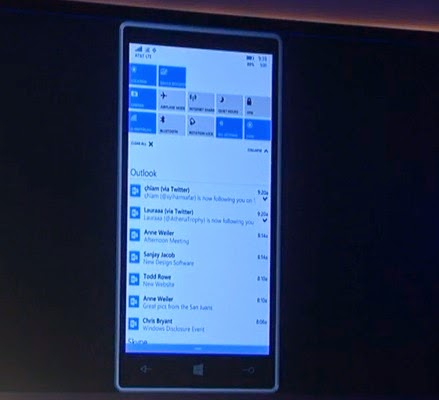
Action(Notification) Centre - Expand Settings Buttons

AppList (Recently Used Apps)

Skype + Messaging

Hey! Cortana

Asking cortana to send an E-mail to your friends without using keyboard.


New Microsoft Word in Phones

New Microsoft Power Point in Phones

New Microsoft Power Point in Phones

Outlook Mail and Outlook Calender

New Outlook Calender

New Universal Outlook Mail App - Swipe Left to delete - Right to Flag

Welcome Spartan..!

All new Spartan Browser

Includes Cortana :)

New Photos App on Phones

New Photos App on PC

Making Folders and Grouping

Viewing Pictures..


 Gaming On Windows 10
 In-Built Xbox App

Get directly to Feeds and Xbox profile


 Play Game , Share all just like an Xbox from any Windows 10 device


Performance of DirectX 12- exclusive to Windows 10

Chat with your WhatsApp friends from your PC


It's simple to set up, and as long as your phone has a data connection you'll be able to send and receive messages via the WhatsApp service right from your PC.
To connect your web browser to your WhatsApp client, simply open https://web.whatsapp.com in your Google Chrome browser. You will see a QR code --- scan the code inside of WhatsApp, and you're ready to go. You have now paired WhatsApp on your phone with the WhatsApp web client. Your phone needs to stay connected to the internet for our web client to work, and please make sure to install the latest version of WhatsApp on your phone.
How to Scan QR Code..?


Unfortunately, there's no web solution at this time for iOS users because of limitations of the platform. You will have to wait.

Windows 10 for Phone Full Changelog


This post offers a tour of some of the new features that will be included in Windows 10 for Phones.

Full Wallpaper support & Translucent tiles:
  • Full Wallpaper support is here, finally along with option of Translucent tiles

New AppList
  • With “recently installed” feature on the top of the list

Enhanced Action center:
  • Notifications synced with PC
  • Single items can be dismissed
  • Can be expanded to show many more quick action buttons
  • Actionable toast notifications are finally here

Calling App

Skype integrated Messaging App
  • Messaging app can have now Skype and IP messengers integrated.
  • Messaging is now a separate app in store to provide updates.


New Office - Microsoft Word..


  New Office - Microsoft Power point..


The All New Maps- with navigation.
  • Microsoft has built a brand new Maps app that includes the best of Maps, HERE Maps, HERE Drive+, and Bing 3D Maps.
  • It can provide turn-by-turn directions by voice.

The New Universal Photos App
  • Auto enhancement feature, that can be turned off
  • Auto Album creation


New Universal Outlook Calender

New Universal Outlook Mail App


New Improved keyboard and typing experience in Windows 10 for Phones.
  • Keyboard position can be adjusted for comfortable writing experience
  • Voice to text typing is finally here
  • Much improved and natural voice to text recognition for typing. Identifies “Hashtag”!


Settings are organised in Windows 10 for phones
  • Sorting gets much improved and is now segregated under categories

Universal Spartan Browser 
  • Cortana integration: Cortana comes to help you at right moments in Spartan
  • Offline Reading mode, reading list
  • Support for widest range of content

Other Universal Apps.
  • Universal People Hub
  • Universal Music app with OneDrive cloud playback and playlist syncing integration
  • Touch-optimized Office apps
  • New Universal Outlook mail app


And best news is that all Windows Phone 8.1 devices are upgradable to Windows 10. Satya Nadella also announced that a new Windows Phone Flagship is coming with Windows 10.

Lumia Camera coming to all Windows phones


Microsoft is taking the Lumia Camera code as the base for the new camera app, including its faster load times, and putting it right into Windows 10. This means that HTC and Samsung devices will soon get those cool manual controls, and new simpler UI found in Lumia Camera 5.0. It should be a part of the upcoming preview next month.
Finally, there was one big change to the demo we saw tonight. Previously, when you tapped the little photo icon in the upper left corner, it launched into a photo history instead of the formal Photos app on Windows Phone. In Windows 10, this changes. Now, that button takes you into the newly announced Photos app experience directly. It's a small but smart change.

Settings on Windows 10 for Phone


Windows 10 completely revamps Settings once again, but this time it trickles down to the phone. It looks dead simple now.


Windows 10 for Phones : Changes and Features


Here are the major changes and new features revealed coming with Windows 10 for phones.
  • Enhanced Action center: Can be expanded to show many more quick action buttons and actionable toast notifications are finally here
  • Revamped app list: With “recently installed” feature
  • New Settings app: Sorting gets much improved and is now segregated under categories
  • Full Wallpaper support: Full Wallpaper support is here, finally
  • Skype integrated to messaging: Messaging app have messengers integrated
  • Voice to text typing is finally coming
  • New universal Photos app
  • Universal People Hub
  • Universal Music app with OneDrive cloud playback integration
  • Spartan Browser
And best news is that all Windows Phone 8.1 devices are upgradable to Windows 10. Satya Nadella also announced that a new Windows Phone Flagship is coming with Windows 10.

New touch-friendly office & new Outlook coming to Windows Phone


Microsoft today unveiled new touch-friendly office for Windows Phone devices and Windows Tablets that will come with Windows 10 update. It will be free and bundled with Windows 10. As per the demo the new office looks much more powerful and touch-optimized.

Microsoft also unveiled a new universal outlook app and the name suggests it will similar feel on all the Windows 10 devices be it Desktop, Phones and Tablets.

Windows 10: The Next Chapter (In Pictures)


Check For More Pictures


Gadgets and Tech News © 2014. All Rights Reserved | Powered By Akillzhere | Windows Team

Designed by-SpeckyThemes